Work Faster in Windows With Launchy and a few Python Scripts

    Eating the Mouse

    Launchy is a great productivity tool and a cool way to impress your friends. You can launch any application by pressing a hotkey (say Alt+Space) and the first few letters of the application for eg: typing ‘gi’ will display the GIMP icon and pressing Enter will launch GIMP. You can download Launchy from its website and its beta is pretty stable (and gorgeous) on my XP laptop too.

    Using Launchy gets pretty addictive and soon you will hate using the Start menu or even Explorer on Windows for opening applications or files. So I took the red pill and started automating the following things with a little help from Python:

    • Launching Intranet applications inside Internet Explorer (even if Firefox is your default browser)
    • Bringing minimized or overlapped windows to the foreground

    Some Necessary Evil

    Don’t get me wrong, I hate IE as much as you do. But the fact of life is that many web apps out there “Work best when viewed in IE” (TM). Even if you have launchy plugins to launch the web app, if your default browser is Firefox, it might show incorrectly. Here is the solution:

    1. Install Python and Pywin32
    2. Copy the following script to the Utilities directory (it will be in the path where you installed Launchy) and save it with a .pyw extension not a .py extension

    ie.pyw:

    
    from win32com.client import Dispatch
    ie = Dispatch("InternetExplorer.Application")
    ie.Visible = True
    ie.Navigate(r"http://intranetapp/home")
    

    In the above code replace the URL http://intranetapp/home with the URL of your choice.

    Finally, open Launchy, right-click and say ‘Rebuild Index’.

    No more Alt-Tabbing around

    If you are like me, you’ll have a lot of windows open at the same time. I have tried increasing the task bar height and grouping similar windows feature in XP to manage them. But I always wish I could invoke commonly used open applications like my chat window in just a few keystrokes. Launchy doesn’t index open programs by default, but with some python magic I can show you how to bring some commonly used windows to the foreground:

    1. As before, install Python and Pywin32
    2. Copy the following script to the Utilities directory (it will be in the path where you installed Launchy) and save it with a .pyw extension not a .py extension

    windowfore.pyw:

    
    import sys
    from win32gui import GetWindowText, EnumWindows, ShowWindow, SetForegroundWindow
    from win32con import SW_RESTORE, SW_SHOW
    
    TITLE_MATCH = "Microsoft Excel - Expenses.xls"
    
    def listWindowsHandles():
        res = []
        def callback(hwnd, arg):
            res.append(hwnd)
        EnumWindows(callback, 0)
        return res
    
    def listWindowsNamesAndHnd():
        return [(hwnd, GetWindowText(hwnd)) for hwnd in listWindowsHandles()]
    
    def unminimizeWindow(a_hwnd):
        ShowWindow(a_hwnd, SW_RESTORE)
        SetForegroundWindow(a_hwnd)
    
    def finder1():
        for hwnd, title in listWindowsNamesAndHnd():
            if TITLE_MATCH in title:
                unminimizeWindow(hwnd)
    
    finder1()
    

    In the above code change the string Microsoft Excel - Expenses.xls with the title the window you would like to summon.

    Finally, open Launchy, right-click and say ‘Rebuild Index’.

    This works even if the window was minimized.

    I hope, finally you can throw your mouse away. Ah… What a bliss!
    Comments →

    Best Software Doesn't Have To Be The Hardest To Make

    A dusty road

    Many, many moons ago, I used to frequent a long dusty and weed-ridden road with the dreams of a pompous education. While the path opened many doors, the dream still remained a mere mirage. The chasm between IT ‘Real World’ and my Engineering classes was shockingly wide, deep and treacherous. My Govt. Engineering College is still an asylum for Dreamers. Their eyes are still full of dreams and heads full of unfinished ideas.

    But after those 4 years, I am not disillusioned. Actually, far from it, I have the fondest memories of trying (perhaps in vain) to try and make a difference, to an educational system gathering dust. ‘Softcorner’ was one such attempt that I had spearheaded. Apart from coining a punningly clever name for a software exhibition. I tried to make the demo’ed software as approachable to the ‘Average Joe’ as possible (You might wonder how many Average Joe’s one would find in an Engg college. Trust me, plenty!!). We designed a mascot character who would explain different technical concepts in a simple language through posters. I had to think how to visualize concepts like Huffman encoding and Data Structures in the language of comics. In fact, some of my friends didn’t know I could draw until that day ! ;)

    Of course, a software exhibition would be incomplete without cool software. We had some bright fellows who were developing pretty interesting software thanks to Pramod Sir, who gave us lots of guidance. But we needed many more projects to make it truly a moderate sized exhibition. I, for one, felt a lot more responsible and wanted to develop 3 or 4 projects in this short time span. Being a little egoistical, I wanted them to be decent crowd pullers as well. In hindsight, a major handicap was that there was no Internet connection, so ‘online applications’ were out-of-question. So in circa 2001, this zeroed down to practically using Visual Basic 6.0.

    I had 3 project ideas at that time:

    1. A
    [Kaun Banega Crorepathi](http://en.wikipedia.org/wiki/Kaun_Banega_Crorepati)
    (KBC) Simulator
    
    1. A Biorhythm
    Calculator
    
    1. A simple VGA game

    My timeline was one week. Please note that I had to manage the logistics of preparing for Softcorner in parallel (I am not going to add ‘meanwhile complete my assignments’, because it wasn’t much of a workload then). All these applications had to look attractive and should be running full screen.

    From the TV Show

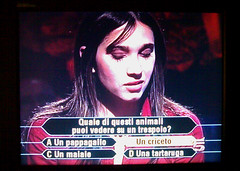
    As it turns out, the first project was easiest to code. KBC is basically the Indian clone of the gameshow based on ‘Who Wants to Be a Millionaire?’ All the game requires is a way of picking random questions and allowing the player to pick among four alternatives. Regular viewers of the show are quite familiar with the hexagonal interface and gimmicky confirmatory questions by the host like ‘Lock Kiya Jaaye’ or ‘Confident?’. Armed with Photoshop and a GK book, all this went into the design of the game. The whole affair didn’t take that long and within one night, I had the EXE ready (What a productive one night stand !;) !)

    Fateful Graphs

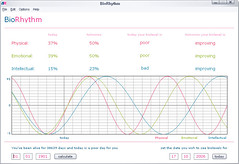
    But the second project turned out to be the hardest to make, despite being the second time I was developing a Biorhythm application. The date functions and the math never seemed to find a middle ground. I also didn’t have a working Biorhythm calculator to confirm. So in terms of testing, this baby was a nightmare. But I must admit that with its cool sinusoidal graphs and calendar buttons, I was extremely proud of it when it was finished.

    Games are no monkey business

    The game was pretty much DOS based and used Allegro for graphics. It was a variant of “Bouncing Babies” except with Chimps. It had pretty much all the usual features of a DOS game like High scores list, Help screens and various difficulty levels. It was fun designing the physics for this game(isn’t it always so !;) ?), but certainly not eye candy for the masses. Again, adding all the features, took quite a bit of coding in C++.

    The D-day finally came and we were all tensed. We tried to market as best as we could. If we pulled-in only the “geek crowd” and some senior lecturers, then it would turn out to be a flop show. So, we tried the simplest trick in the book, attract more girls! It was simpler than we thought, we started distributing some handouts to the ‘target population’ (an MBA term I later picked up) and also some extensive word-of-mouth publicity. The crowds slowly trickled in and soon a bunch of wide-eyed girls are listening intently to a demonstration of ‘Huffman’s Compression Algorithm’.

    Being egoistical, as mentioned earlier, I always kept an eye on my 3 projects and the results still astound me. The first project was without exaggeration the star of the show. Many wanted copies of the simulator and wanted to know how it worked(!) They kept pondering over questions like - ‘Why does it repeat some questions?’ (it had some 30 odd questions in its database), ‘How does it make such smart comments?’ (random no: generator) etc. If you have ever seen the original game show, the main selling point is the tension built just before the participant answers the question. The viewers hang at the edge of their seats wondering if the words coming out the person on the hot seat will take him/her to the next higher rung or seal his/her fate forever. Many felt that my simulator could recreate a bit of that drama successfully.

    It was an important lesson at that point. Basically, Do your research well before you start coding. Spending Herculean effort on any venture will make you biased on judging the success of the project. But often, simple but effective ideas ‘click’. Probably, I should say one of the best lessons I learnt from GEC.

    PS: All images are copyrighted by their respective owners. They are not screen shots of the software mentioned in the article

    Comments →

    Our Outdoor Shoot is Released!

    Well, well… have I been busy ;) All this while I have been wondering about the long overdue Role change and when it finally happens, I’m still wondering what’s the big deal… Ignore maadi.

    Most wedding albums in Kerala at least have a (partly film songs inspired) outdoor shoot. The locations are traditionally the nearby paddy field or some overgrowth of trees.

    Our outdoor shoot isn’t very different, but hopefully done more tastefully. The locations are places around my hometown, Thrissur like Nehru Park and Velingankunnu. The camerawork was done by Sudheep. Direction by him and yours truly. Click on more to see the video and do write in your comments….

    Comments →

    TAPMI Homecoming 2007

    Hope all of you had a fab weekend. Mine was a little more interesting this time. Almost all of our last week was spent setting up our new apartment in Ladyhill. This week some of us TAPMIians had our good ‘ol Homecoming. Actually more of old than good. However I thought it’s a great idea to take Vidya along to show where I scrammed around for two years.

    There was a party/culturals and it was pretty obvious that the no: of engineers in the current batch of students have shot up, right upto the level of saturation. Not the grooviest night out I have had, I’ve got to say.

    The best part was, of course, Manipal. End-point is still the best place to kick start your romance (and to end them abruptly ;) ). KMC greens, with its curvy beauties, is still the best place to remind you that grass is always greener on the other side. Not to forget the boozer’s paradise – Shackpoint is now relocated to a less deserted area. Except for that, every pothole is very much where we had left it.

    Some pics which we took over the weekend:

    Long Way After PG

    http://www.flickr.com/photos/arun_ravindran/1511389525/ (in front of good ol TAPMI)

    Vidya Lisa Smile

    http://www.flickr.com/photos/arun_ravindran/1511389513/ (if only I had penny for every time I asked her to smile ;) )

    Edit The official snaps from the Homecoming are here http://picasaweb.google.com/alumni.tapmi/Homecoming2007

    Comments →

    Wedding Microsite is Up!

    A big thanks to everyone who greeted me for the Engagement. I’ve been a bit tied up with my own wedding preparations lately that the blog is wanting some updates for sometime now. But I haven’t been neglecting ArunRocks. As the title suggests, welcome a new addition to the site:

    http://www.arunrocks.com/wedding/

    You may find it a little incomplete for now, but don’t worry, it will be updated with the latest photos and gossip ;)

    Keep watching the space!

    Comments →

    Making Python Scripts Show Windows-friendly Errors/Stacktrace

    Most of us love to distribute our python programs to others once you have finished coding a neat little script. For Windows users we package it using Py2exe or cx_freeze. However, many of the end-users will not be happy with a black command window popping up, say, when an error is thrown.

    Of course the alternative is to write a full blown GUI application using WXPython or PyFLTK. Even the latter, though quite lightweight, adds several megabytes to the distribution, when all you need is a simple message-box indicating an error or showing some informational text. Clearly, its an overkill for your throwaway python scripts.

    This is the kind of problem I typically face and I have found a good solution. The answer is ctypes library which comes as a part of the standard distribution from Python 2.5 onwards. It simply calls the messagebox function from user32.dll (which is always present in a windows installation). With the main problem solved, what remained was to obtain the error text and stack trace.

    Let’s see how the code looks like:

    # Importing all the works for a native Win32 Message Box
    from ctypes import c_int, WINFUNCTYPE, windll
    from ctypes.wintypes import HWND, LPCSTR, UINT
    prototype = WINFUNCTYPE(c_int, HWND, LPCSTR, LPCSTR, UINT)
    paramflags = (1, "hwnd", 0), (1, "text", "Hi"), (1, "caption", None), (1, "flags", 0)
    MessageBox = prototype(("MessageBoxA", windll.user32), paramflags)
     # For printing the stack
    import sys
    import traceback
    from time import sleep
    
    def show_popup(text):
        print text
        MessageBox(text=text, caption="Sample App Says...")
    
    def mainloop():
        raise "Uff!"
    
    if __name__ == '__main__':
        try:
            mainloop()
        except:
            type, value, sys.last_traceback = sys.exc_info()
            lines = traceback.format_exception(type, value,sys.last_traceback)
            show_popup("Aiyooooo..... there has been an error!\n" +
                "Exception in user code:\n" +
                "".join(lines) +
                "===== Please mail a screenshot to arunvr@gmail.com ===="
                )
        finally:
            sleep(1) # show the console output for a second so that users can read it
    

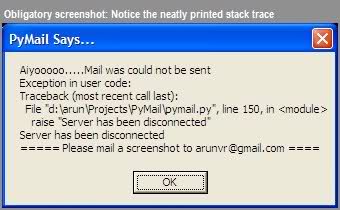
    EDIT: This is how it looks like in PyMail, one of my scripts-that-grew-into-an-app ;)

    Screenshot of a Python Stacktrace in a Messagebox

    Comments →

    Yet Another Year To Rock Away*

    This year’s birthday was yet again celebrated in the best place I could possibly think to celebrate - Mangalore. Once again they have written a truly wonderful writeup about me. Check it out…

    Arun Ravindran

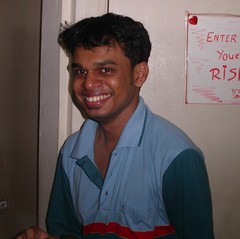
    Hmmm..so, the dude in the pic is celebrating his birthday.does he need a formal introduction from us or what??!!! If ever there was one guy about whom it was hard to find a description in just one word, then it is Arun Ravindran.call him a gadget freak, regular blogger, an ardent music lover, photographer, pencil drawing enthusiast, flash programmer..and he will answer to all of your calls!! Because, he is no ordinary person, for him being extraordinary is just another day!!

    He was one of the active participants in this year’s Ittesbin Skit from ES. Didn’t get to see him onstage? That’s because he was busy back stage giving voice. And don’t think that his voice talent was limited to just one character; more than one role in the ES skit was backed up by his voice!!

    Don’t just think that he is good at the extracurricular stuff; he is one of the back bones of his project team. He had joined Infosys in May 2004 as an A.CON in ES (EAI). After working for the UBS and BP at onsite, he came to GAPEAIR2 project and to Mangalore.

    He is one witty person who always likes to see the smile on other people’s face. He is also an avid reader and he constantly updates his blog. Maybe because he is also interested in drawing, all his “sweets at my deskFCFS” mails are associated with maps showing the easiest route to his cubicle!!!

    Word has leaked out to the smilES team that he has to keep at least two parties in the food court (excluding all the other parties outside) so as to make all his friends happy, such is his popularity in this Minfy!!

    Lets all wish this talented dude a very happy birthday!!

    Check out these snaps too

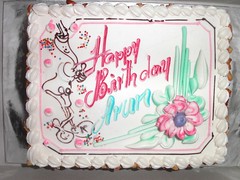
    Running for cover Cake at Home

    Of course you can enjoy them directly at Flickr

    * - The title is inspired from the expansion of Infy rock group - YANTRA which stands for the awesome expansion “Yet another night to rock away”.

    Comments →

    About Laurels and Golden Sandals

    Last week was very eventful for me. I have been keeping myself close to 100% utilized in one way or the other. Rather than bore your with a long rambling of events, let me tell you some of the highlights

    • I co-directed a skit for an annual cultural program which won the first prize. Among other things, I also did voice-over, sound editing and camera work. Camera work? Yep, that’s right, we also played some funny ad spoofs in the skit. One of which has become a huge hit and a viral video of some sorts. Check out the Malabar Gold Sandals ad at Youtube and post your comments.

    • Designing an Intranet portal to celebrate our unit’s successes. Among many sections, the quiz section was a dynamic application written in ASP that was visited by atleast one participant every 3 seconds. Why ASP you would ask. The answer is that we use an NTLM system to authenticate the users. The server was windows 2005 which somehow made installation of PHP very tricky and there wasn’t enough time to try out the Python alternative

    • Overcoming my learning curve for GIMP. GIMP was always known to be as capable as Photoshop. But I never got around to learning its GUI as easily. In office, I have started to use GIMP exclusively for designing mailers, newsletters, websites and what what not. I have to say that some of its features are yet to be found in Photoshop, but I much faster in the latter. I also use Inkscape in a small way. I’m trying to move towards vector designing tools for all my Photoshop needs.

    • Learning Haskell especially after noticing its sudden rise in popularity. Okay this is truly slow progress. I still have no idea how to make non-trivial applications in Haskell. But I’m reading SICP and Haskell textbook in parallel.

    That’s all for the round-up folks. I’m working with a new client these days, hence (unsurprisingly) learning (yet) a new data warehousing tool called Datastage. I shall post my sister’s wedding snaps soon.

    Comments →

    Photoshop Route To Bollywood

    A quick flashback to 2002, when we were just in the first year of MBA at TAPMI. The culturals were coming up and I was asked to make something witty and catchy for my team called ‘Hum’. The following poster is a morph of a well known Amitabh Bachan, Rajnikanth starer mega-budget Hindi film of the same name. Almost all the faces have been morphed with members of our team:

    Photoshopped poster of Hindi film ‘Hum’ with guys from TAPMI 2002 batch

    Capturing Cambridge

    Here is a little slideshow of the photos I took, from my Cambridge trip

    Of course you can enjoy them directly at Flickr

    « Newer Page 12 of 20 Older »