Our Obsession with the Culture of Doing

    You cannot learn to swim by reading a book…
    You cannot learn to drive by reading a book…
    You cannot learn to code by reading a book…

    You can only learn these things by practice.

    Boy reading in the grass - Copyright flickr.com/photos/norby/

    But are reading books a waste of time? Absolutely not. Learning by doing will only get you so far as in perfecting something you already know. For instance, if you know the basics of operating a car, in due time, you can move around comfortably. This does not mean that you can take very good care of the car or understand traffic rules. Most of us learn these things through friends or a driving instructor.

    But books offer a much more reliable and insightful information (say a simple automobile service kit). They are usually written by experts in their respective fields. They have years of wisdom to back what they have written. Interestingly, this is not just applicable to non-fiction but also in fiction. Be it reading about the mathematical ingenuity of a symbologist or the experiences of hitch-hiking in a romantic Scottish highlands, the written word enriches your experiences with many lifetimes that you haven’t lived yourself.

    Similarly, programmers jump to ‘on the job trainings’ and claim to have acquired expertise based on the years of experience they’ve spent on a technology. It is quite debatable on what they have mastered. They might be able to get something working but it will be a far cry from an elegant or a well-designed solution. Reading does wonders in acquainting one with the best practices of a technology area. Indeed, the well-read ones are quite easy to spot too.

    The culture of doing is as important as the culture of learning. Both go hand-in-hand. But the emphasis must not shift purely to doing as it shows tangible results. The results must in itself demonstrate the depth of learning. Often, opening the bonnet solves the problem rather than kicking the tires.

    Comments →

    Please Watch This Space...

    Please watch this space for more information….


    Of course, after a certain amount time, you will notice a slight flicker in this generous whitespace devoid of any tangible information. Given the time and effort spent in your unwavering gaze, much later, the flicker will multiply into various coloured dots. These dots are a temporary phenomenon called retinal tear.

    But please do continue watching the space. Your answer will reveal in a couple of hours when you hear muffled giggles from the corner of your eyes. This means you have kept yourself still long enough to warrant attention from your colleagues. You have become an imminent and potentially future source of subversive humour. Let this insight not detract you from your current task at hand. Please continue watching the space.

    The passage of time might seem glacial, but it might have been only a few days elapsed since you embarked on this endeavour. The strange tickling sensations tracing a halo-like pattern around the crown of your head might be cobwebs-in-the-making by some opportunistic spiders. The occasional shrill noises at night might not be the usual crickets after all, but little rats ogling at you. The pithy tch, tch from the ceiling might be the most patient audience of them all, the stunned household lizards. They produce these sounds only when they are amazed at some still life which rival their own stillness, out of pure jealously, obviously. However, the good news is that the worst is probably over. So, please continue watching this space.

    In the midst of all this, please do not be surprised, if the prolonged presence of the white’space’ burnt a hole on your LCD screen. This is perfectly natural and probably for the better. You will now have the unrestricted viewing pleasure of an actual space right in the middle of your screen. This is a real ‘window’ and gladly enough, cannot be closed or minimized by any means. This is wonderful news for a patient observer like you. So, please continue watching this space.

    In the meanwhile, the human race which, in evolutionary terms, quite recently got an upgrade from their always quibbling, tree jumping cousins, would have found themselves engaged in a major war of some kind. As a non-participant to this frivolous event, you would probably be quite indifferent to the comical sounding sirens around your place.

    Suddenly through the little window you have been gazing, somewhere in the distance, you might notice a bellowing angry red mushroom cloud. This might be accompanied by a brilliant bright flash of light. But…

    Please, please continue watching this space!

    Comments →

    The Dying Art of Talking Simple

    I am reading an excellent book called Presentation Zen by Garr Reynolds. The book arrived in Mangalore library last week thanks to our wonderful librarian :). The book is a feast for the eyes with its stunning images and beautiful typesetting.

    I read a very interesting passage from the book about the need for clarity of communications. The book says:

    Look at these two messages that address the same idea. One of them should seem very familiar to you.

    a. “Our mission is to become the international leader in the space industry through maximum team-centered innovation and strategically targeted aerospace initiatives.”

    Or

    b. "…put a man on the moon and return him safely by the end of the decade."

    The first message sounds similar to CEO-speak of today and is barely comprehensible, let alone memorable. The second message – which is actually from a 1961 speech by JFK – has every element of SUCCESs and it motivated a nation toward a specific goal that changed the world. JFK, or at least his speech writers, knew that abstractions are not memorable, nor do they motivate.

    There are many examples where I have read 2 to 3 page/screen emails without understanding a word of what they are trying to say. Communication has deteriorated to the point that we are now extremely thankful when someone can explain the gist of the message in a few words.

    The worst thing that can happen is the spread of this culture of obfuscation to the next generation. If that happens, we will lose the art of communicating ideas simply and the real message will be drowned in the noise.

    PS: Recently I delivered a talk on Relevance of IT in Business and used Presentation Zen ideas in my slides. The slides were well received and appeared on Slideshare homepage as well.

    Comments →

    5 gifts to get from your friends in USA

    From an Indian perspective, it will be very hard these days to think of a product which is not available in India. Be it gadgets or books, there are the several websites where one can order imported goods online.

    I had earlier sought suggestions for things to buy from USA which is not easily available in India. After much research, I realised that most of the things in USA are made in China. Well, no surprises there :). After some more serious research, I was able to come up with some items which are not easily available in India, yet have a really good value for money.

    This was 6 months ago. Fast forward to the present and the goodies bag have finally arrived. Let me list down it’s contents:

    • Leatherman Skeletools CX : One of the lightest multi-tools having a knife, wire cutter, universal bit driver (screwdriver) and bottle opener that fits your pocket. Has 25 years warranty

    • Stylus pro: Lightweight ultra-bright pen flashlight made of aircraft aluminium. Uses normal AAA batteries.

    • Board games (Pandemic, Carcassone, San Juan): Some of the most innovative and educational games ever developed for children and adults alike are not computer games but Board games. These three are probably the highest rated (at least two-player) and best value for money I could find.

    • Pound of Dice 100 Pieces: Are you into RPG games? Need a 20 or 30 sided dice? This might be the cheapest way to get a decent collection of dice. You will never be short of dice anymore.

    • Dragon Shield 100 Sleeves : This is for those innovative card games that one might design one day. Need sleeves for your freshly cut card printouts? Look no further.

    It is an eclectic collection, matching my tastes; but I hope there is something for most people here.

    Comments →

    Mars Rover in Python and Haskell

    Last week I tried to do something which I’ve been planning for quite sometime. Porting a Python program into Haskell. In case you didn’t know, Haskell is a purely functional programming language that’s recently become a hot favourite. It has a lot of cutting edge ideas from the academic world esp laziness and strong typing. It has an interesting way to solve the ‘multi-CPU problem’.

    Mars Rover is a famous programming problem used by Thoughtworks in their recruitments. I first solved the problem in Python and later attempted to solve the same in Haskell. I cannot say that I ported it from Python because the approach I’ve used is completely different.

    The Problem

    A squad of robotic rovers are to be landed by NASA on a plateau on Mars.

    This plateau, which is curiously rectangular, must be navigated by the rovers so that their on-board cameras can get a complete view of the surrounding terrain to send back to Earth.

    A rover’s position and location is represented by a combination of x and y co-ordinates and a letter representing one of the four cardinal compass points. The plateau is divided up into a grid to simplify navigation. An example position might be 0, 0, N, which means the rover is in the bottom left corner and facing North.

    In order to control a rover , NASA sends a simple string of letters. The possible letters are ‘L’, ‘R’ and ‘M’. ‘L’ and ‘R’ makes the rover spin 90 degrees left or right respectively, without moving from its current spot. ‘M’ means move forward one grid point, and maintain the same heading.

    Assume that the square directly North from (x, y) is (x, y+1).

    INPUT:

    The first line of input is the upper-right coordinates of the plateau, the lower-left coordinates are assumed to be 0,0.

    The rest of the input is information pertaining to the rovers that have been deployed. Each rover has two lines of input. The first line gives the rover’s position, and the second line is a series of instructions telling the rover how to explore the plateau.

    The position is made up of two integers and a letter separated by spaces, corresponding to the x and y co-ordinates and the rover’s orientation.

    Each rover will be finished sequentially, which means that the second rover won’t start to move until the first one has finished moving.

    OUTPUT

    The output for each rover should be its final co-ordinates and heading.

    INPUT AND OUTPUT

    Test Input:

    5 5
    1 2 N
    LMLMLMLMM
    3 3 E
    MMRMMRMRRM

    Expected Output:

    1 3 N
    5 1 E

    The Python solution

    The Python solution is actually smaller than the problem itself. The readability isn’t that great, but it is quite extensible. In fact, adding a new instruction like B(ackward) would need just one additional line. You can also extend the four cardinal directions to eight with minimal changes to the code.

        
    dirs = "NESW"                   # Notations for directions
    shifts=[(0,1),(1,0),(0,-1),(-1,0)] # delta vector for each direction
    # One letter function names corresponding to each robot instruction
    r = lambda x, y, a: (x, y, (a + 1) % 4)
    l = lambda x, y, a: (x, y, (a - 1 + 4) % 4)
    m = lambda x, y, a: (x + shifts[a][0], y + shifts[a][1], a)
    raw_input()                     # Ignore the grid size
    while 1:
        # parse initial position triplet
        x, y, dir = raw_input().split() 
        pos = (int(x),int(y),dirs.find(dir))
        # parse instructions
        instrns = raw_input().lower() 
        # Invoke the corresponding functions passing prev position
        for i in instrns: pos = eval('%s%s' % (i, str(pos)))
        print pos[0], pos[1], dirs[pos[2]]
    

    The Haskell solution

    I am a beginner in Haskell, so apologies for any bad coding practices. You might notice that rather than using Reflection as in the Python code, I have used Type-inference to invoke the correct function for each instruction. Yet again, this scales well while adding new instructions.

        
    import Data.List
        
    dirs = "NESW"
        
    shifts 0 = (0, 1)
    shifts 1 = (1, 0)
    shifts 2 = (0, -1)
    shifts 3 = (-1, 0)
        
    instrn (x, y, a) 'R' = (x, y, mod (a + 1) 4)
    instrn (x, y, a) 'L' = (x, y, mod (a - 1 + 4) 4)
    instrn (x, y, a) 'M' = (x+fst (shifts a), y+snd (shifts a), a)
        
    showpos (x, y, a) = show x ++ " " ++ show y ++ " " ++ [dirs !! a]
    finddir dirchar = 
        case elemIndex dirchar dirs of
          Nothing -> error "invalid direction"
          Just position -> position
    readpos line = (x, y, a)
            where a = finddir $ head $ drop 1 line3
                  [(y,line3)] = reads line2 :: [(Integer, String)]          
                  [(x,line2)] = reads line :: [(Integer, String)]
        
    robo = do
      posn <- getLine
      instrns <- getLine
      putStrLn (showpos (foldl instrn (readpos posn) instrns))
      robo
        
    main = do
      skip <- getLine               -- Skip reading the grid size
      robo
    

    Key learnings

    Since some of you might be interested in Haskell, I have tried to summarize my experience in Haskell programming

    1. There are no loop constructs. So everything must be done using recursion!
    2. Haskell I/O is very hard. This is because of my little knowledge of Monads. In fact, I solved the logic pretty quickly. It took me a while to figure out the input parsing.
    3. Type inference catches a lot of errors. This is quite handy but error messages are sometimes confusing
    4. I could have used Abstract Data Types for directions but it would have made the code lengthier

    In short, programming in Haskell is a mind-bending exercise. Highly recommended!

    Comments →

    The Trainees

    They started with fifteen cats. They were the finest, whitest, softest, cutest cats you can ever imagine. They would purr when stroked liked the sweet purring of a stroked cat. Except with extra cuteness that could only come from the finest breeds. Each one was hand-picked from various homes after a lengthy selection process. The Feline Resources Department visited around three hundred homes. They found only fifteen because the rest were an abomination to the word Cat. They were neither cute nor soft. I mean, what sort of a cat is neither cute nor soft? They were rejected immediately. The remaining fifteen were perfect - for work.

    Most hamsters were shocked to find cats at their office. After all, it was an office of hamsters. Every hamster had their own personal cage-icle and wheel. The perks were also good. The company had provided free flax seed machines at every floor. The cage farms were massive, sprawling and impressive structures. One had been designed like a inverted pyramid with the upper cages almost defying the laws of physics. One had a gigantic blue gel-filled sphere in the middle. Nobody knew what the sphere meant. Many thought it was aesthetically pleasing, while many also thought that it was a bloody waste of space.

    The older be-speckled hamsters raised an eyebrow when the new joinees cat-walked into the aisle. Could this be the end, they wondered. There is only so much that their tiny arthritis-ridden legs can run. Besides they weren’t getting any thinner with all the free flax and junk food. There is only so much that a wheel can carry. Some even did a mental math of the remaining instalments to their pension funds.

    The group was led by a particularly slender and attractive cat. She halted outside the Animal Resource Head’s door. The head, an elderly hamster motioned her inside. She smiled demurely as she confidently walked into his cabin accompanied by the rest of the clowder. The discussion lasted for about an hour.

    Finally, the leader exchanged pleasantaries and stepped out of the room with the dossier for their first assignment. With an expression of disbelief she opened the file and read their objective:

    PRODUCE 15 HAMSTERS IN ONE MONTH

    Comments →

    Poem - Epic

    Epic

    ‘Tis their chase littered with unending corpses
    ‘Tis a dogged race with the savages of Norse’s
    I’ve slain them again and again
    Still their shadows circle us from bloody skies
    Fire breathing dragons like Satan’s kites

    Fragrance of jasmine from her lovely tresses
    Mixes odours with the rotting carcasses
    Her warm breath behind my neck
    Holding me tight, her lips part ways
    Fear not, I comfort with resolute gaze

    A deranged one dives with burning eyes
    Unsheathing the sword over the precipice
    Life plays a ghastly roll of the dice
    A swift evasion and a mighty sweep
    A dismembered head shrieks over the heap

    On the handle of my sword my fingers tightened
    She held me tight, lithe arms wrapped from behind
    Her lovely countenance rests lightly on me
    My palm placed on hers, my mind easen
    My steed gallops gently towards the horizon

    Comments →

    The Secret of Innovation

    Why is the human body such a perfectly designed machine? I mean, it is such an incredibly complicated system consisting of million of cells, designed by a genetic code, each with a specific purpose. It is an incredibly complex feat of engineering if one were to design it from scratch.

    Artistic representation of Cells

    The answer is Evolution. Evolution is a continuous process of attaining perfection through small steps. The steps are some what like this

    • Lets start with a fairly evolved species
    • On a global scale creating life is cheap
    • Every generation is an minor experiment involving producing a unique combination of genetic attributes
    • The attributes might or might not help the offspring that only time will tell
    • The ones with beneficial attributes like intelligence, attractiveness thrives
    • One in a long period of time, a mutation i.e. significant change in attributes happen.
    • This mutant might or might not survive.
    • If it survives and multiplies, it might or might not supplant the earlier species.

    This cycle continues over millions of years. This cycle has resulted in millions of diverse and interesting flora and fauna. The key to all this is, in fact, step 2. It is cheap to create something. Something different. The difference might be minor at first, but the cumulative effect of several minor changes is very significant.

    This is how creativity works. This is how innovations work. There must be an environment to experiment and create without too much overhead. The time from conception (of an idea) to birth (i.e. implementation) must be short. This is the basic idea behind prototyping.

    Taking this analogy to computer languages, most of the innovative applications are now first implemented in a dynamic language than a statically compiled language. The traditional statically typed languages require more overhead due to increased line count and lack of ready to use libraries. The time from concept to implement is longer. Dynamic languages permit the prototyping of more ideas at the cost of less optimal implementations.

    This is why copying ideas and applying it to areas different from where it was intended often works. It is cheap to reproduce an idea. It might have been a result of thousand iterations. But the idea is already born now. The genetic code has been designed and it has been proven. The next step is to clone the idea and start tinkering with it in small ways. You might very well be innovating.

    The real secret of innovation is in making prototyping, experimenting, iterating or whatever you call it, cheap.

    Comments →

    Managing Creative Assets - 3: TortoiseHg Tutorial

    Managing Creative Assets is a multi-part series on how you can manage your creative works such as a novel or even blog post without impairing your creativity. It highlights the importance of using a version control system as an integral part of one’s creative workflow. Part 1 gives a good introduction to the series which is aimed at technology novices

    Getting started with Mercurial: A tutorial

    The concluding part of this series will be the installation and typical usage of Tortoise Mercurial, a user friendly GUI front-end for Mercurial. It is commonly referred to as TortoiseHg (the chemical symbol for mercury).

    This will be a fairly simple tutorial to follow as each description is followed by a screenshot. These screenshots were taken on Windows XP, but they will be pretty similar in other OSes

    Download Tortoise mercurial from the Bitbucket site. There are installables for Windows as well as for Linux. Installation on Windows is fairly straightforward as it is wizard-based.

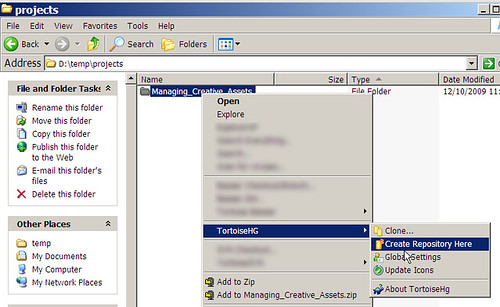
    1. Create a new folder for keeping your art assets. This will be your project folder. In this screenshot (click for a larger image), I have created a project folder for the purpose of composing this series of blog posts. Simply right-click, and select ‘Create Repository here’ under the TortoiseHg sub-menu:

      010 - Create.png

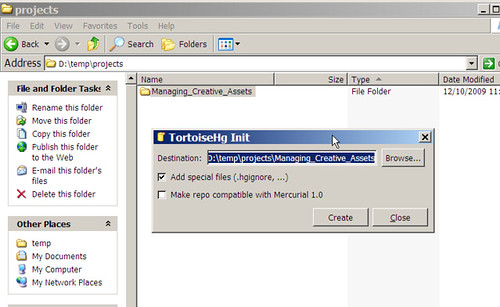
    2. The defaults in the ‘Create Repository’ dialogs are fine. Just click Create.

      020 - Create Dialog.png

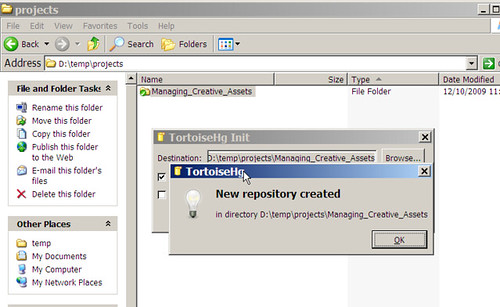
    3. The new repository has been created. That was easy, wasn’t it?

      030 - Created.png

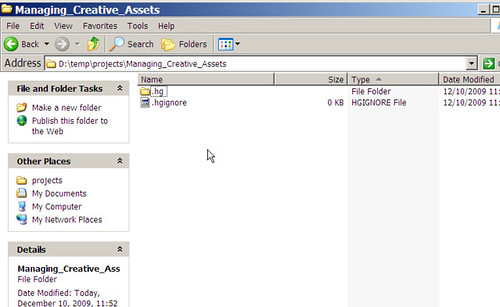
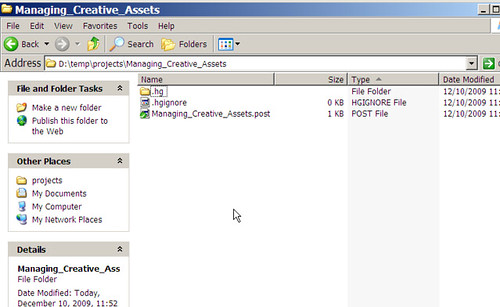
    4. Now, enter the project folder and view the changes. On some OSes, you might see nothing here. These files are not intended to be seen or modified, hence they might be hidden. You can safely ignore them.

      040 - Project folder.png

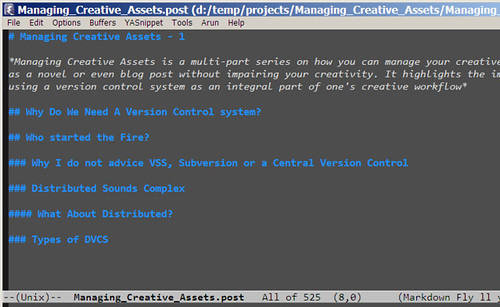
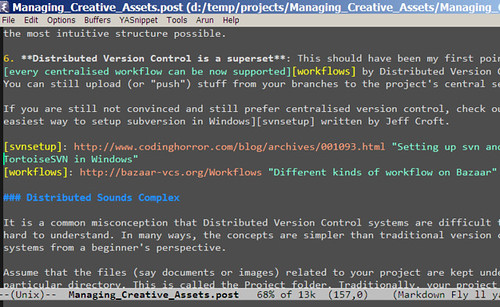
    5. This is a screenshot of a new file that I am editing (using Emacs editor) inside the project folder. I am ready to check-in this file.

      050 - New File on Emacs.png

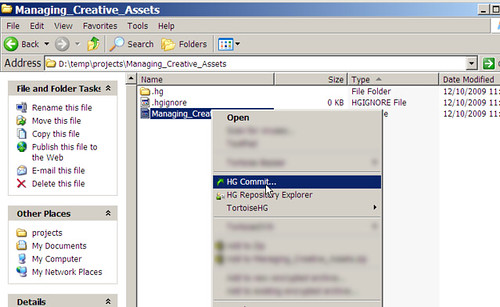
    6. Now, you will need to add this new file to your repository. Let’s skip that and directly perform a commit. We will be later given a chance to add this file.

      060 - First Commit.png

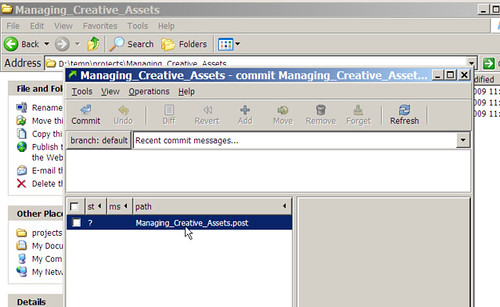
    7. Here you can see our newly added file as unchecked. This means that this file is not yet under version control

      070 - Commit Dialog.png

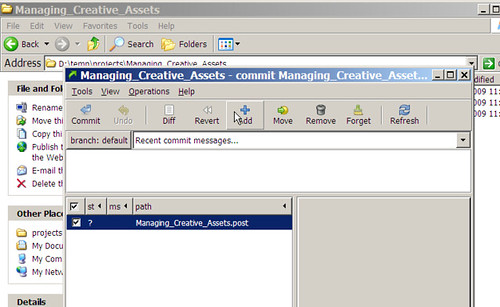
    8. Go ahead and mark the check box next to this file

      080 - Commit Dialog File Added.png

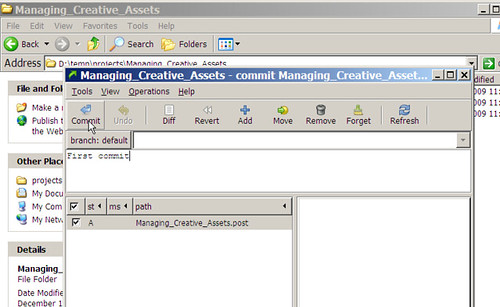
    9. In the edit box above, you can add a short comment about this commit. Since this is the initial commit, my comment is simply ‘First Commit’

      090 - Commit Dialog Comment Added.png

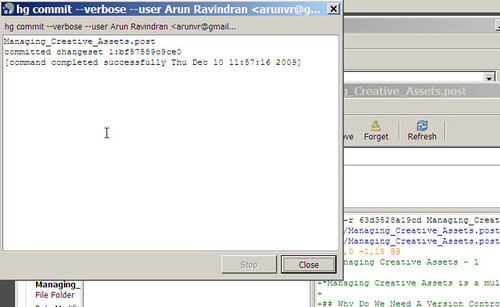
    10. Mercurial acknowledges the successful commit with the name(s) of the committed files

    100 - Commited.png

    1. Notice that your file has a green tick icon indicating a successful check-in

    110 - Overlay Icons Added.png

    1. Many hours and many check-ins later, my post is nearly close to completion. I commit this version as well.

    115 - Emacs Final Screen.png

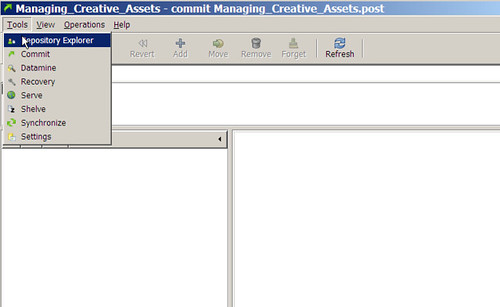
    1. In the commit dialog, notice the Repository Explorer in the menu.

    120 - Going to repo explorer.png

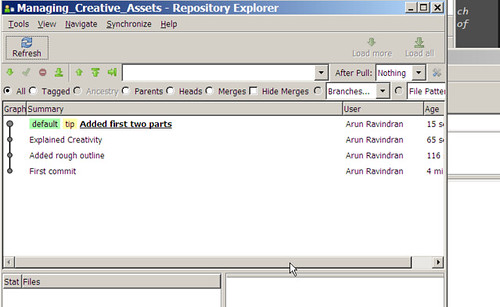
    1. You can view the history of changes in reverse chronological order. You can right click on any of them to compare the changes or revert back to an earlier version.

    130 - Repo explorer.png

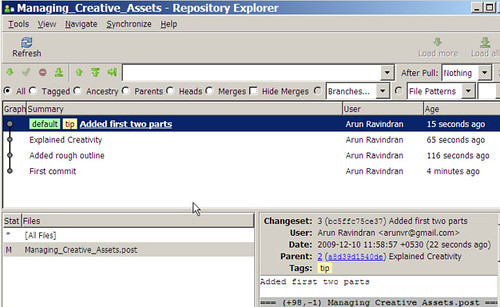
    1. Simply clicking on each version will show the diff (in UNIX format) between the consecutive versions in the lower right window.

    140 - Repo explorer shows changes.png

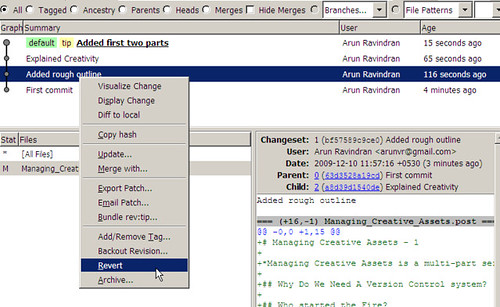
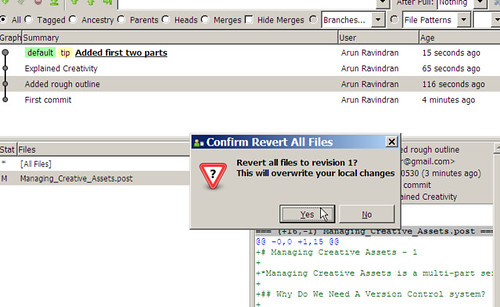
    1. You can perform a revert by selecting the Revert option.

    150 - Reverting.png

    1. As indicated by the warning, your current file will be overwritten to an older version. But subsequently you can revert to the latest version as well, so this is not too much of an issue.

    160 - Revert Confirm.png

    That’s pretty much all you need to know to use Tortoise Hg. Hope you found this series informative!

    Comments →

    Managing Creative Assets - 2: Distributed Version Control Systems

    Managing Creative Assets is a multi-part series on how you can manage your creative works such as a novel or even blog post without impairing your creativity. It highlights the importance of using a version control system as an integral part of one’s creative workflow. Part 1 gives a good introduction to the series which is aimed at technology novices

    Who started the Fire?

    In April 7, 2005, Linus Torvalds wanted to use a version control system to replace the proprietary BitKeeper system for developing Linux Kernel. He absolutely hated CVS (the version control system in vogue then) with a passion. So, he did what he did best, he wrote his own. This resulted in the release of a version control system called git.

    The development of git led to a sudden interest in distributed version control systems (DVCS). Though it was not the first of its kind (earlier open-source DVCS existed like Arch and Monotone), it was the first mainstream DVCS.

    Today, one of the first choices you need to make while selecting a version control system is whether it is centralised or distributed. Let’s understand this from own unique stand-point i.e. for managing creative assets.

    Why I do not advice VSS, Subversion or a Central Version Control

    What is a Centralised Version Control (CVC)? The odds are that most of the version control systems that you might have heard of are Centralised for e.g. VSS (Microsoft Visual Sourcesafe), CVS, RCS, Clearcase or Subversion.

    If you are planning to use a version control for personal use involving no or minimal collaboration with others, I would strongly recommend not to use a centralised version control system. You can skip to the next section, if you don’t want a detailed set of reasons on why I recommend non-centralised version control.

    The reasons I would cite here are a mix of usability issues and technical limitations. The usability issues are subjective but I am sure many find them genuinely annoying. I am making an assumption that since this is for personal version control management, so your CVC server would probably be installed locally. The problems are:

    1. Everything is stored inside repositories: Adding your project to a CVC effectively creates a duplicate layout of your project inside the CVC server. For e.g. if you created your subversion repository within C:\svn, all your projects will be kept inside this folder. You will have to maintain another filesystem inside this server using arcane commands.

      In a distributed version control system, you simply manage the project directory inside your normal filesystem. All the version controlled files will still be inside the project directory. This is quite useful since your project directory can be moved to a different location easily and the version history will be completely intact.

    2. Server must be always running: If you have installed VSS or SVN locally, you must always remember to start the server. This can be configured to run as a service, but you will need admin privileges for this. This is not required in a distributed version control.

    3. Offline activity cannot be checked-in: This is an oft-quoted technical limitation. You need your svn server running to make any check-ins or check-outs, making it considerably less useful whenever you are offline. But this is less of an issue in our case, since I assume the svn server is installed locally.

    4. Remembering to checkout immediately after you import or check-in: Ever had the feeling that your files magically disappeared only to realise that you haven’t checked out? This is an irritating ‘feature’ of CVS. The files appear and disappear as you check in and out. Even worse is that they are sometimes read-only and sometimes writeable. This is confusing and irritating from a usability standpoint.

      Apparently, most people leave their relevant files checked out at all times to avoid this confusion. But that would defeat the purpose. In a distributed version control, the files are always present where you expect them to be. This leads to less confusion and a world of improvement in terms of usability.

    5. Weird layout: Ever seen a funny looking directory structure with truck, branches and tags directories? Then you might be looking at a project under SVN. Ever wondered which directory actually contains your code? The right answer is trunk. I am not sure, if this is the most intuitive structure possible.

    6. Distributed Version Control is a superset: This should have been my first point, almost every centralised workflow can be now supported by Distributed Version Control. You can still upload (or “push”) stuff from your branches to the project’s central server.

    If you are still not convinced and still prefer centralised version control, check out the easiest way to setup subversion in Windows written by Jeff Croft.

    Distributed Sounds Complex

    It is a common misconception that Distributed Version Control systems are difficult to use and hard to understand. In many ways, the concepts are simpler than traditional version control systems from a beginner’s perspective.

    Assume that the files (say documents or images) related to your project are kept under a particular directory. This is called the Project folder. Traditionally, your project folder will be stored in a central server. Hence the name centralised version control.

    Whenever you would need to use a particular file within this folder, you will need to check-out and once you have reached some logical point (say after adding a few paragraphs in your essay or sketching the torso of a toon) you would check-in.

    These check-ins are like check-points. More check-points you add, the more finer undo history you will get. Fewer check-points will mean that there will be a lot of differences from one check-in to another making it less useful.

    As you might have guessed, every time you need to check-in or check-out you will need to connect to the server. Hence, practically, you will need the server (installed on your machine or elsewhere) up and running at all times.

    If someone else would like to work with you on the same project, they will need to connect to your server. If they would like to work on the same files that you are working on (a rare case), they would need to create a branch and work on the branch.

    This collaborative scenario is slightly different when you are working with a DVCS.

    What About Distributed?

    In a distributed version control system, your friend would rather clone your entire project than branch it. After creating a clone, his copy will be identical to your repository in every way. It will have the entire version history intact.

    He no longer needs to be connect to your repository, he can work independently. In fact, there is really no need for a server in DVCS. The repository is actually created within the project folder.

    For instance, let’s take the initial scenario. You would like to add your project folder to version control. In a DVCS, the project folder is slightly modified to add some additional information (meta-data) which is typically hidden from the user. Hence, your project folder remains mostly intact and it doesn’t have to move into a server.

    In short, the defining feature of DVCS is that there can be more than one “central” repository for the same project. In case, your repository gets nuked, the cloned repository with your friend is always available as a perfect clone. To quote:

    “Only wimps use tape backup: real men just upload their important stuff on ftp, and let the rest of the world mirror it ;)” – Linus Torvalds (1996-07-20)

    Types of DVCS

    These are the popular open-source DVCS available:

    • Git - Very fast DVCS by Linus which runs on UNIX but has a weak port to Windows.
    • Mercurial - Fast cross-platform DVCS by Matt Mackall of Selenic. Partly written in Python
    • Bazaar - User friendly cross-platform DVCS by Canonical (of Ubuntu fame). Written in pure Python

    Selecting a DVCS, like most things, is a personal choice. So, you might want to read a more detailed comparison before making a choice. I would be explaining Mercurial in my next article because it has a nice selection of all the desired features.

    Do comment if you found DVCS more interesting or otherwise…

    Comments →

    « Newer Page 8 of 20 Older »